
From the outside, everything can appear normal. The site loads, bookings arrive and the ad account keeps spending.
What does Google Ads count as a conversion?
Any action configured as a conversion. In this account, page views, add-to-carts and checkout starts had each been assigned a value of one, while purchases carried the meaningful sales value. The Conversions column counts the recorded actions. Conv. value adds up the values attached to them, so a busy Conversions column does not necessarily represent much money.
Put Conversions next to Conv. value and the gap becomes clear. Ten thousand recorded actions with a total value of ten thousand describe a very different account from one hundred purchases with a total value of one million.
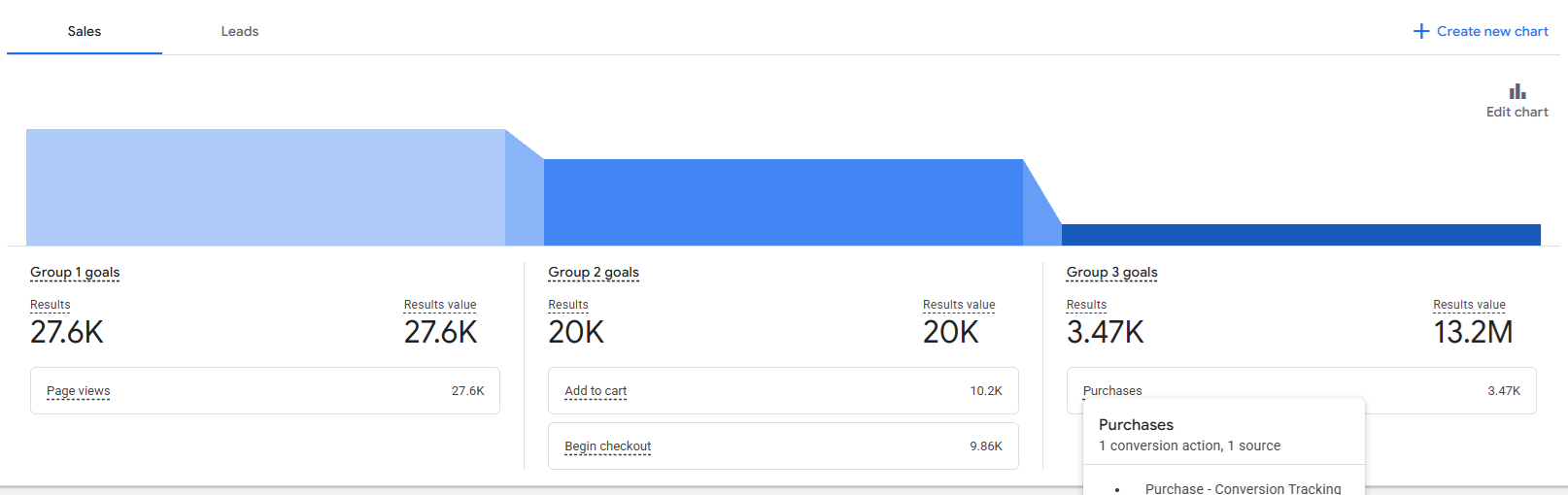
A campaign that uses only the purchase as its primary goal is easier to read. Its Conversions column shows the recorded purchases, without page views and other micro-conversions mixed into the count.
Why can revenue vanish while the tours keep selling?
Google Ads can report only what the website sends it. If a tag change removes the price or quantity from each booking, the sale still happens but the cart data reaching Google Ads is incomplete. The campaigns do not stop. The warning may sit quietly inside the conversion-goal diagnostics.
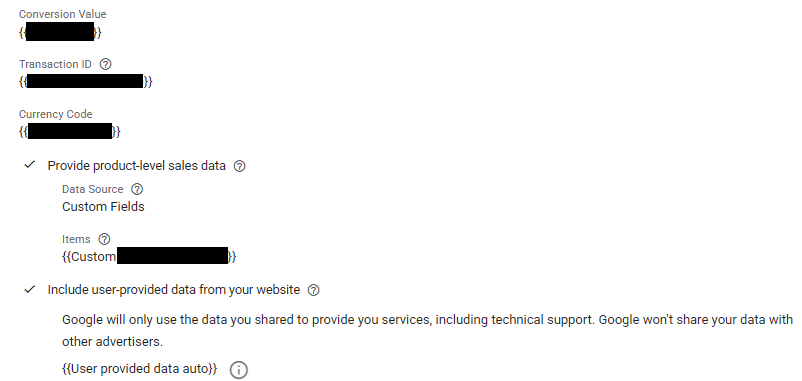
In the account we took over, the purchase tag expected product-level sales data for every booked item. The variable building that list returned one item with an ID and nothing else: no price and no quantity. The Revenue metric uses the cart item data, including price and quantity, so it fell to almost zero and stayed there. Conversion value still arrived, but it was degraded. That was the value being used by value-based bidding.
The evidence was there, but it was easy to miss. The conversion goal showed: "Some recent conversions have cart data with formatting issues." Opening the notice revealed: "Item price incorrectly formatted or missing: 100.00%." The account continued spending while the warning went unaddressed.
// Before: one item, an ID, no price, no quantity
function () {
  return [{
    id: {{Tour ID}},
    item_id: {{Booking item ID}},
    google_business_vertical: "travel"
  }];
}

// After: every booked item, with its price and quantity
function () {
  // The real version also cleans up number formats before converting
  var items = {{DLV - Items}} || [];
  return items.map(function (it) {
    return {
      id: it.item_id || it.id,
      item_id: it.item_id || it.id,
      item_name: it.item_name || it.name,
      price: Number(it.price) || 0,
      quantity: Number(it.quantity) || 1,
      google_business_vertical: "travel"
    };
  });
}
From the field
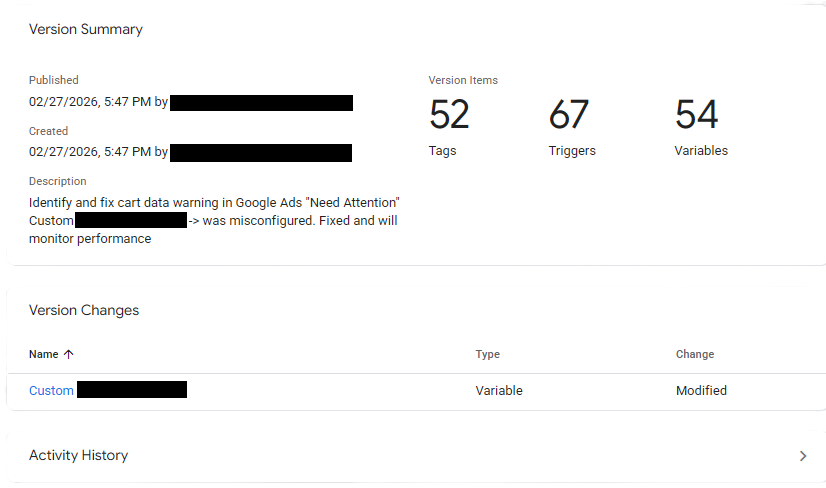
The repair centred on one variable. It now reads the booking system's own item list and sends each item with its price and quantity. The production version also normalises different number formats before converting the prices; that helper is omitted from the simplified snippet above. Once the corrected variable went live, Revenue returned in Google Ads.

Can a wrong number change how your campaigns bid?
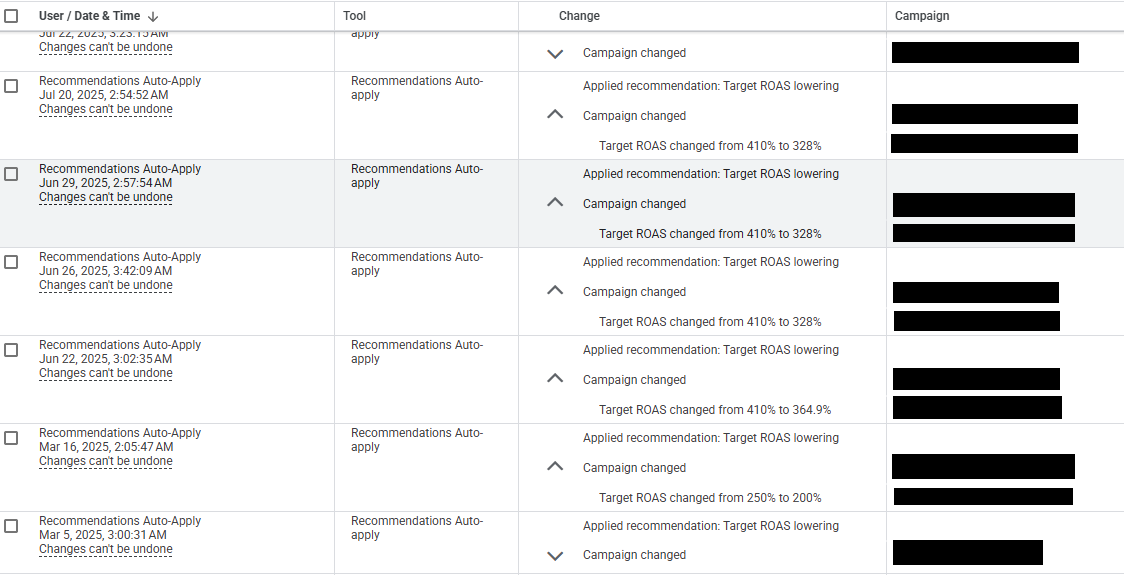
Yes. Value-based bidding optimises towards the conversion value it receives. When that value collapses, campaigns appear to miss their targets even while bookings continue. If auto-apply has been enabled, Google can also apply recommendations that lower those targets without a person reviewing each change at the time.
That happened repeatedly in this account. Google's recommendations lowered the target ROAS 24 times and never raised it once. Every entry in Change History used the same wording: "Recommendations Auto-apply", "Applied recommendation: Target ROAS lowering" and "Changes can't be undone". The changes were applied between two and five in the morning.
Watch out
Enabling auto-apply authorises Google to change selected settings without a fresh manual approval each time. The "Changes can't be undone" message means the entry cannot be reversed automatically from Change History, but the target can still be corrected manually. Check which recommendations are enabled before drawing conclusions from an account trend.
The account had other problems too. Blog pages received budget intended for booking pages, ads reached the wrong markets and irrelevant searches went unblocked because no negative keywords had been added. Those issues came from the campaign feeds and targeting setup. The broken reporting made them harder to judge, but it did not prove that tracking alone caused them. The Performance Max setup deserves its own article.
Four checks you can run tonight, without changing a setting
-
Open Goals, then Summary, in Google Ads.
Look for notices about missing or badly formatted data on your conversion goals. A status such as "Needs attention" is where the problem in this account was recorded.
-
Check container quality in Google Tag Manager.
Review the container-quality overview for errors. A warning that some pages are not tagged may be irrelevant, but only after you confirm those URLs sit outside the landing-page, checkout and booking journey.
-
Look at the goals of every running campaign.
Confirm which conversion actions each campaign optimises for. This creates an audit trail of what the budget is actually buying. A campaign bidding on page views is buying page views.

The purchase goal, set as the primary goal across the campaigns in this account. -
Search Change History for "Recommendations Auto-apply".
Then open the auto-apply settings under Recommendations. This shows which targets changed automatically and which recommendations are currently allowed to make changes.
How do you compare Google Ads with your booking system?
Start with the booking system, because it records the completed sales. Compare those bookings with the purchases reported in Analytics and Google Ads. The totals will not match perfectly: consent, attribution, currency conversion and reporting delays all create normal differences.
What matters is the pattern. A modest, explainable gap is different from a metric collapsing on one identifiable date. A sudden break gives you a place to investigate. Check what changed in the website, booking system, data layer or Tag Manager at that time.
What else can break tracking without warning?
Anything that touches the tracking setup can cause a problem. This can be a theme or server update, a change inside the booking system or a renamed field in the data layer. These changes rarely announce that they have broken a tag, so tracking should be checked after updates that affect the booking journey or its data.
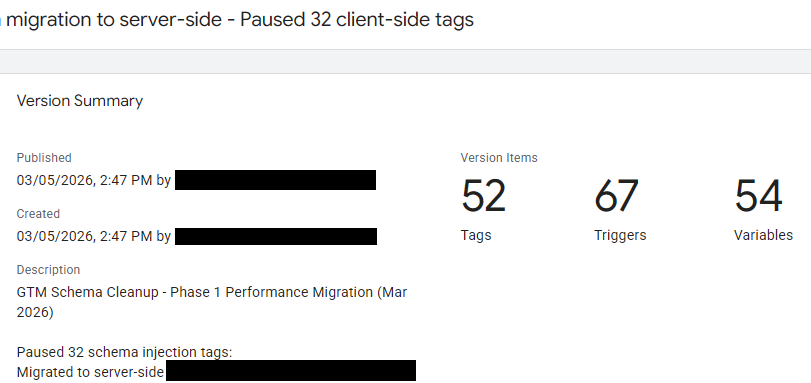
The same account had another fragile dependency. Thirty-two Tag Manager tags built the site's structured data in the browser by reading values from each page. Those tags were paused and the structured data moved to server-side generation. That reduced the dependence on page markup and removed 32 client-side tags. The purchase variable was also changed to read the booking system's own item data rather than values supplied by the theme. The implementation still needs monitoring, but it now has fewer moving parts.
Is more budget the fix?
More budget cannot repair missing measurement. Pausing a campaign immediately can be just as premature if the campaign is still producing bookings that the report fails to show. First compare the advertising data with the booking system, inspect the bidding targets and conversion setup, and decide which hypothesis the evidence supports.
In this account, the first response to missing reported revenue had been to increase spend. The tag remained broken, the campaign structure and feeds were not corrected, and no negative keywords were added. More money went into a setup that still could not explain where the value came from.
Once you have a likely cause, change one material setting and measure the result. If several parts of the account change together, you lose the ability to tell which change helped or harmed performance.
When is it time to get help?
Get help when nobody can connect a change in the account to a verified change in bookings. If decisions keep following opinions such as "spend more", "spend less" or "list on more platforms", an audit can reconnect the advertising reports to the sales that actually happened.